top of page



MODView-Pro Detail Features
Pro product allows you to use a variety of advanced features than the function of the product Standard. It provides a variety of fabulous and powerful functions such as “Projection Area”, “Interference Check”, “B.O.M”, “Explode”, "Analyze Radius" “Analyze Draft Angle”, “Analyze Under Cut”, “Create 3D AVI”, “Scene Manager” and “Fitting BoundBox”.
[License Type]: Node Version(1PC, Fixed), Network Version(Floating, Concurrent)
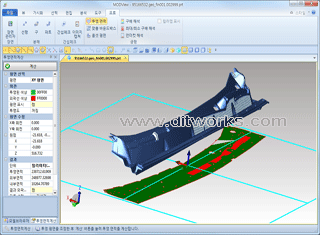
Projection Area
- Automatic calculation of the projected area such as XY/YZ/ZX Plane, Perpendicular plane
- Automatic calculation of the projected area / outer area / inner area
- Save the IGES/DWG to the projected shape that is generated
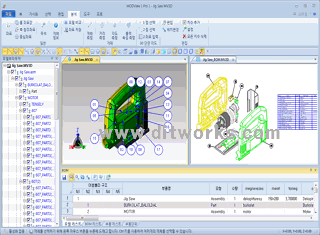
Create BOM (Bill of Material)
- Create assembly B.O.M with one selection
- Automatic balloon display and manual placement support
- BOM creation contents can be saved as an Excel file
-
BOM can be projected in 2D to display balloon and save as dwg

Create Family Chart
- Automatically generates flow charts of assemblies with one selection
- The flow chart can be saved as an Excel file (.xlsx), and it can be projected as 2D and saved as a dwg file
- It is convenient to create flow chart which is used frequently by auto parts maker

Interference Check
- Automatically check interference by entering a value in the range between two parts
- Automatic detection contact portion with the interference and express by color
- Paste in the document by copying the image of the interference part

Analyze Draft Angle and Under Cut
- Measure draft angle conveniently and it can be displayed angle by color
- Under Cut is displayed by color, support minimum and maximum draft angle
- Determine the angle and coordinate immediately by using mouse
- Used in injection mold design
Time Line (Create .avi file)
- Easily create video files (. avi) by registering the contents of MODView work into a timeline
- Save work as a movie easily in the MODView
- It can be saved to “.mv3d” what you have work, and can be modified or edited to read again
- Click on a video on the left, and please watch a demo movie

Explode
- Create a state in which the decomposition of the shape that assembled complex
- Explode by the linear / sphere / part
- Save as a scene disassembled state

Seane Save
- To save the current working conditions and back to the scene at any time
- Create a video file by using the saved scenes
- When you save a generated scene as opr3d, that registered scene will also be stored
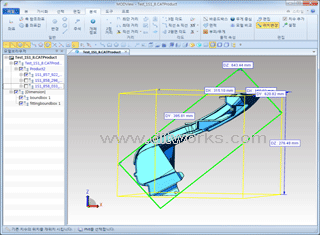
Fitting BoundBox
- Without setting, simply measure the outer size of the product that is inclined
- Products assembled complex, check immediately with one click outline size of each component
bottom of page